Choose the tracks you actually mix by
Put up to four reference tracks — dialogue, effects, music, guide or whatever anchors your decisions — directly under the picture.
Built for film and television mixers, Live Waveforms lets you choose the dialogue, effects, music or guide tracks that anchor your decisions and puts them directly over the Pro Tools Video window. Stay with the scene and mix more instinctively, without turning back to the timeline for visual reference.
Picture from Atasco, Season 4 on Prime Video. Live Waveforms controls sit on the left, with selected dialogue and music waveforms moving directly over the picture.
Every glance back to the Edit window takes the mixer away from the face, gesture, cut or sync point that the decision is really about.
Choose up to four visual references. Peaks, clip edges, fades, markers and muted regions travel under a fixed playhead while the story stays in front of you.
Configure the strip around the material you are judging now, from a dialogue guide to effects, music or multichannel stems.
Put up to four reference tracks — dialogue, effects, music, guide or whatever anchors your decisions — directly under the picture.
See clip gain, fades and crossfades, track names, Pro Tools markers and a zebra overlay for muted clips.
Choose Center, Left, Right or LCR on multichannel tracks. Stereo channels stack, and multi-mono MXF is supported.
The overlay finds and follows the Pro Tools Video window — or switches to a manual position when the room needs it.
Use the familiar Pro Tools shortcuts and the overlay follows the same vertical waveform-zoom steps.
Track choices, colours, layers, scale and layout travel with the session. Machine-specific sync and anchoring stay local.
Everything you need to place the overlay, decide what it shows and make it readable against the picture.
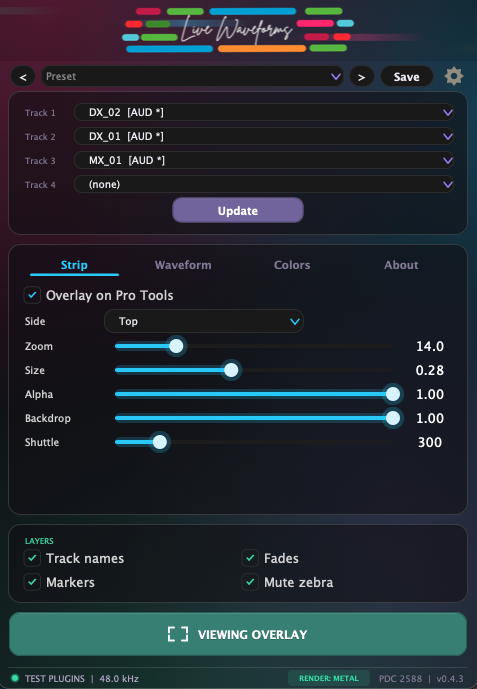
Place the overlay on any side of the Video window, then set time zoom, size, transparency, backdrop and shuttle speed.
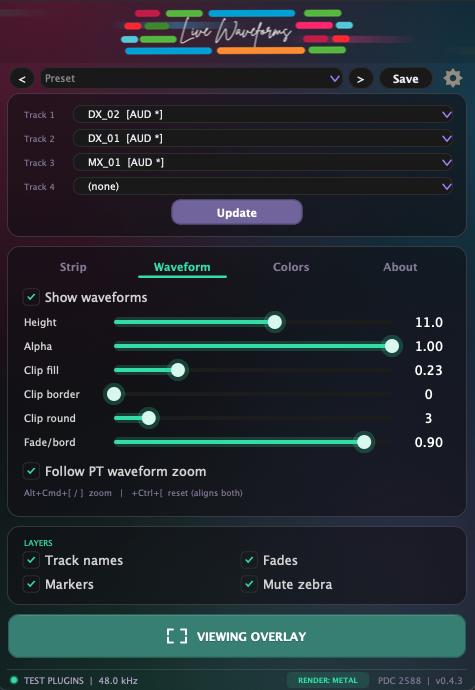
Shape waveform height and alpha, clip fill, border, rounding and fade visibility — or follow Pro Tools waveform zoom.
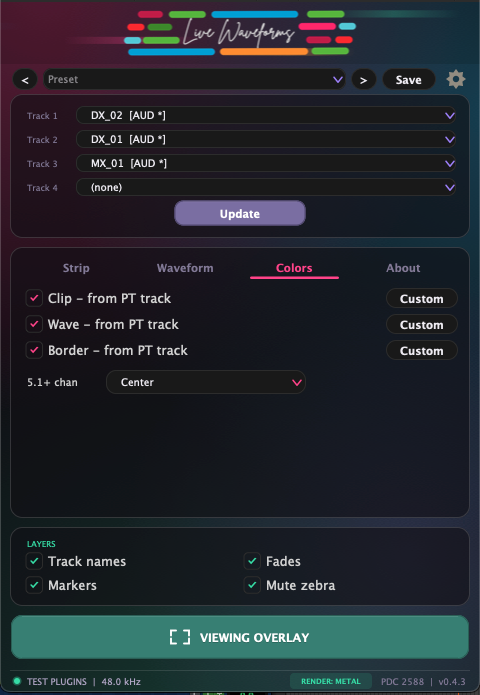
Inherit clip, waveform and border colours from Pro Tools or set your own, then choose the channel shown on multichannel sources.
Live Waveforms is an AAX instrument that generates no sound and changes no signal. It reads the session, follows the host playhead and paints a separate click-through overlay.
Choose up to four tracks. The selection returns with the Pro Tools session.
Open the overlay. It anchors itself to the Video window or uses your saved manual position.
Work from the picture. Save the session to refresh new edits automatically, or use Update whenever you need it.
LAYERS
Live Waveforms brings the few tracks you are judging now into the same visual field as the performance, cut or sync point that drives the mix.
Keep breaths, starts, stops and clip boundaries in view while you stay with the actor.
Read impacts, transitions and dense effect passages against the exact frame they support.
See entrances, endings and dynamics without turning back to the Edit window.
Keep a guide, Pic Cut or Scene track visible beside the material you are mixing.
Keep the references that guide your mix directly on the picture.
Includes 2 licence seats—move them between machines, online or offline. No iLok.
Try the complete plug-in free for 15 days. No credit card required.
You already have access
The complete 18-section guide covers setup, waveform layers, multichannel display, video anchoring, sync, presets and troubleshooting.
Read the Live Waveforms manualNo. It is a silent AAX instrument: there is no audio in the signal path. It reads the Pro Tools session through PTSL and draws a separate click-through overlay.
It is designed first for film and television re-recording mixers who need to judge picture, performance and reference tracks at the same time. Instead of turning back to the Edit window, you choose the waveforms that guide the mix and keep them on the picture.
Up to four tracks at once, stacked in the order you choose.
Yes. It supports stereo and multichannel tracks including LCR, 5.1 and multi-mono MXF. On tracks above stereo you can display Center, Left, Right or LCR.
The strip is locked to the host playhead sample for sample, subtracts the session PDC and includes a per-machine offset for the latency of your video chain.
In automatic mode the strip follows it across moves, resizes and displays. If the window disappears, the strip hides instead of floating over Pro Tools. A manual anchor is available for unusual setups.
Live Waveforms v0.4.3 is for macOS and Pro Tools only. It is a Universal AAX plug-in for Apple Silicon and Intel, signed and notarized for macOS 12 or later. It relies on Avid-specific AAX and Pro Tools SDK technology, including PTSL/Scripting, so there are no AU or VST3 versions and it cannot run in other DAWs. An open Pro Tools Video window is required.
Each perpetual licence includes two licence seats, so you can activate Live Waveforms on two Macs at the same time and move either seat when your setup changes. Activation works online or offline, no iLok is required, and the complete plug-in can be tried free for 15 days. The current price is shown live on this page.
Yes. The complete 18-section Live Waveforms user manual covers installation, track selection, waveform layers, anchoring, sync, presets and troubleshooting. Read the manual →
Choose the references, stay with the performance and let the timeline come to the picture.