 Free download · Mac & Windows
Kaizen Audio Manager
The desktop app to download and manage all your Kaizen Audio libraries. Sign in with your account, pick what you own, and let it download and unzip everything for you.
v1.0.8 · macOS · Apple Silicon & Intel (226 MB) · Windows 10/11 (96 MB) · signed & notarized

From your account to your DAW
No download codes, no browser ZIPs to babysit. Three steps and your libraries are on disk.
Download & open
Download the disk image below, open it and drag the app to your Applications folder. It’s signed and notarized by Apple (Apple Silicon & Intel) with the ticket stapled in, so it opens with no security warnings — even offline.
Sign in
Open the app and sign in with your Kaizen Audio account — the same one you use to buy. Every library you own shows up automatically.
Pick & download
Click any library and it downloads in the background. Multi-part archives are reassembled and unzipped for you — ready to drop into your DAW.
Built for big sound libraries
Your whole library, in one place
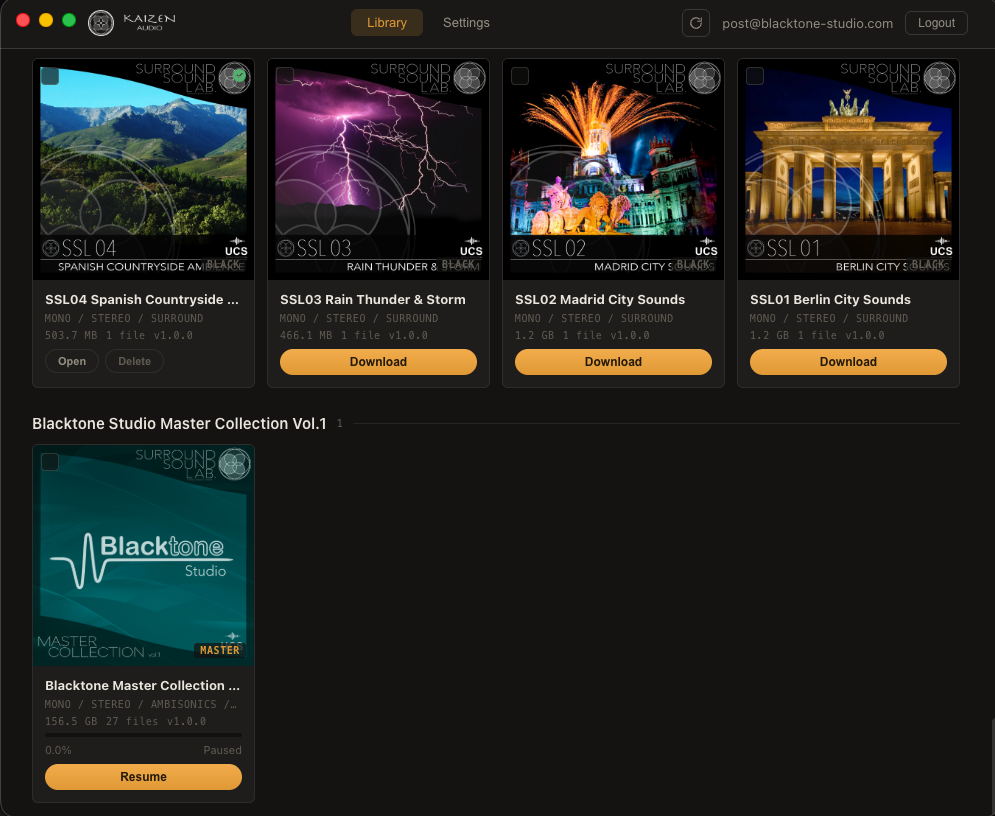
Sign in once and see everything you own — Surround Sound Lab, Blacktone Master Collection and more — covers, formats, sizes and file counts at a glance.
Download & extract, automatically
Big libraries ship as multi-part ZIP / RAR archives. The app downloads every part, reassembles them and extracts the lot — you just get the finished files.
Pause, resume, survive drops
Stop and continue whenever you like. A dropped connection during a multi-gigabyte download resumes from exactly where it left off instead of starting over.
Pick where it lands
Choose any destination folder. Before it starts, the app checks you have enough free space for the download plus extraction so a session never fails halfway.
Built for big catalogs
Switch between grid and list views, group by family or label, select several libraries and download them in one go.
Always up to date
Hit Refresh and any new releases or libraries added to your account appear right away — no reinstalling, no waiting.
Everything you own, ready to pull
A clean, dark library of your collections. Covers, formats and sizes up front, a Download button on every card, and the Master Collection right alongside your Surround Sound Lab volumes.
What you need
- ✓ macOS 12 Monterey or later
- ✓ Apple Silicon or Intel — universal build
- ✓ A Kaizen Audio account with at least one library
- ✓ Signed & notarized by Apple — opens with no warnings
On Windows
Kaizen Audio Manager runs on Windows 10 and 11 too — same account, same libraries, same automatic downloads. Just grab the installer and sign in.
Download for Windows · v1.0.8 · 96 MB